
Choosing Internet speed can feel like a guessing game. Buy too little capacity and everyone may notice when video calls, streaming, downloads, and games happen at once. Buy far more than you use, and you may be paying for speed that rarely affects your experience.
A better approach is to look at what your household actually does online. Once you understand simultaneous use, download speed, upload speed, and latency, it becomes much easier to choose the right Internet plan.
Once you have a rough speed range in mind, you can compare residential Fiber Internet options based on download speed, upload speed, and availability before deciding what fits your household.
How Much Internet Speed Do I Need? Key Takeaways:
- Your ideal Internet speed depends on simultaneous users, activities, and both download and upload needs.
- Around 100 Mbps may suit lighter households, while busy families may benefit from 500 Mbps, 1 Gig or even 7 Gigs.
- Simultaneous Internet activity matters more than simply counting how many devices are connected.
- Streaming, gaming, video calls, uploads, and large downloads can increase the bandwidth your household needs.
- Faster Internet may reduce congestion, but Wi-Fi problems and latency can still cause buffering or lag.
- Fiber Internet with symmetrical speeds can benefit households that frequently upload files, video chat, livestream, or create content.
Internet Speed Needs: The Quick answer
Quick answer: There is no single Internet speed that every household needs. The right speed depends on how many people are online at the same time, what they are doing, and how much download and upload bandwidth those activities require.
Around 100 Mbps may be enough for lighter or smaller households. Around 250 Mbps may be a useful middle ground for smaller households with multiple people online at the same time. Families with several people streaming, gaming, working from home, and using connected devices simultaneously may benefit from 500 Mbps or more. Large households may find that 1 Gig provides useful extra capacity, and power users may require even more speed.
The FCC currently uses 100 Mbps download and 20 Mbps upload as its benchmark for fixed broadband in its 2026 Section 706 Report, but that is a policy benchmark – not a personalized recommendation for every home.
| Household or use pattern | A useful starting point |
|---|---|
| Single user or light household | Around 100 Mbps may be sufficient, depending on activity |
| Several people with moderate simultaneous use | Around 250 Mbps may be a useful starting point for smaller households with several people using the Internet at the same time. |
| Busy family with frequent high-demand activity | 500 Mbps may provide more useful headroom |
| Large household or power users | 1 Gig or more will be worthwhile |
These are starting points, not guarantees. Your actual Internet usage matters more than the number printed on a plan.
What Determines How Much Internet Speed You Need?
Your household’s Internet needs are mainly determined by what is happening at the same time. A home might have phones, tablets, smart TVs, laptops, gaming consoles, smart speakers, cameras, and other connected devices. But simply counting those devices does not tell you how much speed you need.
Simultaneous Use Matters More Than Device Count
Two homes can have the same number of connected devices, but very different bandwidth needs. What matters most is what those devices are doing at the same time.
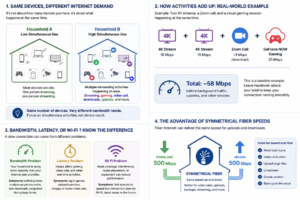
Instead of trying to assign a certain number of Mbps to each person or device, focus on the Internet activities most likely to overlap. Your connection’s available capacity is shared across those activities.
Download Speed, Upload Speed, and Latency
Three terms are especially useful when comparing Internet service:
- Download speed is how quickly data reaches you. Streaming video, browsing websites, and downloading files depend heavily on download speed.
- Upload speed is how quickly you send data. Video calls, cloud backups, livestreaming, and uploading large files depend on it.
- Latency is the delay between sending data and receiving a response. Low latency is especially important for activities such as competitive gaming and real-time video communication.
Internet speeds are usually measured in megabits per second, or Mbps. A 500 Mbps connection has more available bandwidth than a 100 Mbps connection, but simply having the larger number does not guarantee that every online experience will improve.
How Much Internet Speed Do Common Activities Use?
Looking at individual activities gives you a useful baseline. The important step is then considering how many of those activities happen simultaneously.
| Internet activity | Speed consideration |
|---|---|
| Browsing and email | Generally low bandwidth demand |
| HD video streaming | Moderate bandwidth per stream |
| 4K video streaming | Roughly 15-20 Mbps per stream |
| Video calls | Requires both download and upload bandwidth |
| Online or cloud gaming | Speed matters, but latency is also important |
| Large file uploads and cloud backups | Stronger upload speed becomes more important |
| Livestreaming and content creation | Can require significantly more upload capacity |
For example, Netflix recommends at least 5 Mbps for a 1080p stream and at least 15 Mbps for a single 4K stream. That does not mean a household with a 15 Mbps connection should automatically expect flawless 4K streaming. Other people, devices, background downloads, and network conditions may be using capacity at the same time.
Video calls also demonstrate why download speed is only part of the equation. Zoom recommends about 3.8 Mbps upload and 3.0 Mbps download for 1080p video calls. If two people are on separate calls while someone else is streaming or gaming, their combined usage matters.
Gaming adds another consideration: latency. NVIDIA’s GeForce NOW system requirements list 25 Mbps for Full HD gaming at 60 frames per second and also specify a latency requirement of less than 80 milliseconds from an NVIDIA data center. The exact requirements vary by game and service, but the example shows why adding more Mbps does not automatically solve every gaming lag problem.
How Much Internet Speed Does Your Household Need?
The easiest way to choose a speed is to think about your household as a whole rather than one device at a time.
Single Users and Light Households
If you mainly browse the Internet, check email, use social media, watch one stream at a time, and occasionally make video calls, around 100 Mbps may be sufficient.
A single power user who frequently downloads or uploads large files, livestreams, creates video content, or performs several demanding activities at once may benefit from 250 Mbps or more.
Couples and Smaller Households
Couples and smaller households with moderate simultaneous use can consider around 250 Mbps as a practical starting point. That provides more headroom when one person is on a video call while another streams, games, or downloads a large file.
Families and Multiple Users
For families with several people regularly online at the same time, around 500 Mbps may be a better starting point. That additional capacity can help when remote work, gaming, multiple video streams, downloads, and connected devices overlap.
Large Households and Power Users
Large households and power users with several high-demand activities happening at once may benefit from 1 Gig or more. The closer your household gets to multiple 4K streams, large file transfers, content creation, gaming, and simultaneous video calls, the more useful 1 or more Gigs can become.
To see why simultaneous activity matters, consider a household running two 4K Netflix streams, one 1080p Zoom call, and one Full HD GeForce NOW session at the same time. Using the providers’ current recommendations, those activities alone represent roughly 58 Mbps of downstream demand before background updates, additional devices, Wi-Fi conditions, and other network traffic are considered.
That does not mean a plan slightly above 58 Mbps is automatically enough. Think of the calculation as a baseline, then leave reasonable headroom rather than choosing the precise mathematical minimum.
Will Faster Internet Fix Buffering and Lag?
Sometimes. If your household is exceeding the capacity of its current plan, additional bandwidth can reduce congestion when several people are online.
For example, you may need more bandwidth if streaming starts buffering whenever other people begin downloading files or if performance consistently worsens during periods of heavy household use.
However, a faster plan cannot solve every connection problem.
A bandwidth problem occurs when your household’s demand exceeds the available capacity. A latency problem involves delays that can affect real-time activities even when download speed is adequate. A Wi-Fi problem may be caused by weak signal coverage, interference, router placement, or equipment limitations.
That is why a 100 Mbps plan can still feel slow in some situations. The plan may provide enough total capacity while Wi-Fi conditions or latency affect the experience inside your home.
An Internet speed test can help you understand what your connection is delivering. If possible, compare a wired test with your Wi-Fi results to help determine whether the issue is your Internet connection or the wireless network inside your home. For step-by-step guidance, see Clearwave’s How To Run an Internet Speed Test guide.
Why Upload Speed and Fiber Internet Matter
Download speed gets most of the attention, but upload speed matters more as households send increasing amounts of data.
Video calls, cloud backups, security cameras, large file transfers, livestreaming, and content creation can all place more demand on your upload connection. If several people perform these activities simultaneously, limited upload capacity can become noticeable.
Livestreaming provides a useful example. YouTube’s current live encoder guidance lists recommended H.264 bitrates of about 10 Mbps for 1080p video at 30 frames per second and as much as 35 Mbps for 4K video at 60 frames per second. Those figures apply to creators sending video upstream, not ordinary viewers, but they show why upload speed matters for certain users.
The Advantage of Symmetrical Speeds
Some Fiber Internet services offer symmetrical speeds, meaning upload and download capacity are the same.
That can be especially useful if your household frequently sends large files, joins multiple video calls, creates content, or has several people using upload-heavy applications simultaneously.
Clearwave’s residential service offers symmetrical upload and download speeds, making upload performance part of the same speed conversation as downloading.
How to Choose the Right Internet Plan Without Overpaying
The fastest available plan is not automatically the right plan. Your goal is to purchase enough capacity for your household without paying for performance you are unlikely to use.
Before choosing or upgrading an Internet plan:
- Identify your household’s most demanding Internet activities.
- Determine which activities regularly happen at the same time.
- Consider both download and upload requirements.
- Leave reasonable headroom instead of choosing the absolute minimum.
- Do not assume every buffering or lag problem requires a faster plan.
- Compare the actual performance characteristics and terms of available Internet service.
- Consider Fiber Internet if symmetrical upload and download speeds would benefit your household’s video calls, file uploads, cloud backups, livestreaming, or other upload-heavy activities.
When comparing Internet service providers, look beyond the headline download number. The FCC’s broadband-label framework includes information such as typical download and upload speeds, latency, price, data allowances, and relevant plan terms – all useful when comparing services.
The important point is simple: you do not automatically need Gig Internet because it is available. Choose a speed that matches the way your household actually uses the Internet.
Find the Internet Speed That Fits Your Household
The right Internet speed is not determined by the number of devices in your home or by automatically choosing the largest number available. It depends on what your household does at the same time, how much download and upload capacity those activities need, and how much headroom you want for busy periods.
Once you know the speed range that fits your household, compare Clearwave’s residential Fiber Internet plans and check availability at your address.
Frequently Asked Questions A good Wi-Fi speed is one that supports the activities happening throughout your household without regular congestion. Your Internet plan determines the capacity coming into your home, while Wi-Fi conditions can affect how much of that performance reaches individual devices. If you have a smaller household with moderate simultaneous use, 100 Mbps may be sufficient. A household with several people regularly streaming, gaming, working remotely, and downloading at the same time may benefit from the additional capacity available with 500 Mbps. It can be for a light user. If you mostly browse, stream, and make occasional video calls, you may never use most of that capacity. A single power user who handles large downloads, uploads, livestreams, or several high-demand activities simultaneously may have more reason to choose a faster plan. Choose based on your household’s busiest periods. For small families, 500 Mbps provides ample capacity for simultaneous activity. A large household with several power users, multiple high-quality streams, large file transfers, and other demanding activity may benefit more from 1 Gig or even more. With Clearwave, you can get speeds up to 7 Gigs to ensure you always have plenty of bandwidth for your current and future needs. Your equipment must be capable of supporting the speed you subscribe to if you want to take full advantage of it. The exact equipment requirements depend on your Internet service provider, connection type, home network, and devices. Check with your provider before replacing equipment solely because you are considering Gig service.