
A video doorbell by the front door. A thermostat adjusting itself upstairs. Smart lights turning off at bedtime while security cameras keep watch outside. For many families, smart homes are no longer a futuristic idea. Smart home technology is becoming part of everyday life.
Parks Associates reported in 2025 that 45% of U.S. Internet households owned at least one smart-home device. Those households also averaged 17 connected devices overall, including phones, computers, TVs, and other technology.
As you add more devices, though, convenience is only part of the equation. Your smart home also depends on reliable connectivity. Understanding what these devices need – and where Fiber Internet can help – can make it easier to build a connected home that works for your family.
Smart Homes – Key Takeaways:
- Smart homes use connected devices to automate, monitor, and control everyday household functions.
- Common smart home devices include thermostats, lights, locks, cameras, speakers, appliances, and security systems.
- Smart homes offer convenience and automation but also introduce costs, privacy concerns, security risks, and compatibility challenges.
- Upload speed matters for smart homes, especially when security cameras and video doorbells send footage to cloud services.
- Fiber Internet can support smart homes with strong uploads, low latency, and capacity for many simultaneous connected devices.
- Fiber and Wi-Fi serve different roles, so strong Fiber service does not automatically eliminate weak Wi-Fi coverage
What Is a Smart Home, and How Does It Work?
A smart home uses connected devices to monitor, automate, or control everyday household functions. These may include thermostats, lights, locks, cameras, speakers, appliances, and security systems.
Many smart home devices connect through your home’s Wi-Fi network and Internet connection. You can often control them through mobile apps, voice commands, schedules, or a central smart home hub.
Common Smart Home Devices
- Smart thermostats that automatically adjust heating and air conditioning
- Smart lights, bulbs, and plugs
- Security cameras and smart doorbells
- Smart locks and garage door openers
- Smart speakers and voice assistants
- Smart TVs
- Connected appliances, including washing machines
- Alarm systems
- Smart smoke and carbon monoxide detectors
You do not need all of these devices for your house to qualify as a smart home. You might start with a smart thermostat and video doorbell, then gradually add other connected devices as they become useful.
How Smart Home Devices Work Together
Home automation systems can control or automate devices in several ways:
- Mobile apps for remote monitoring and control
- Voice commands through smart speakers or assistants
- Schedules that automate routine tasks
- Sensors that trigger actions automatically
- Smart home hubs that help connected devices work together
Some devices communicate wirelessly, while others may use hardwired systems. Either way, many depend on an Internet connection for features such as cloud storage, remote access, notifications, and voice controls.
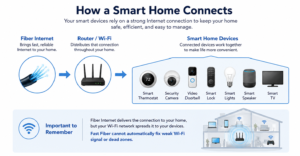
As the number of Internet-connected devices in your household grows, the connection supporting them becomes an increasingly important part of your smart home infrastructure. That is one reason families with connected homes may want to consider residential Fiber Internet.
What Are the Advantages and Downsides of Smart Homes?
Smart homes can make daily routines easier, but they are not without tradeoffs. Before adding more connected technology, it helps to understand both sides.
Advantages of Smart Homes
For many families, the best thing about a smart home is convenience: you can control appliances and other systems without being in the same room—or even at home.
- Monitor security cameras and doorbells remotely
- Lock or unlock smart door locks
- Adjust your thermostat from an app
- Automate lighting and household routines
- Manage energy consumption more efficiently
- Receive alerts from security or alarm systems
Smart thermostats, lighting, and other energy-management tools may also help reduce unnecessary energy use. However, actual cost savings depend on your devices, home, habits, climate, and utility rates.
Downsides and Concerns
The biggest concerns with smart home devices usually involve cost, complexity, privacy, security, and dependence on connectivity.
A new smart home system can require multiple devices, apps, accounts, and software updates. Products from different manufacturers may not always work together as expected.
Connectivity can also be frustrating. Parks Associates reported in 2025 that 52% of do-it-yourself smart-home users experienced setup or connectivity issues. That figure does not mean Internet service caused all of those problems. Device compatibility, software, Wi-Fi coverage, and setup can also be responsible.
Security deserves attention as well. Any networked device can create another point that needs to be protected. Keeping devices updated, using strong passwords, and securing your home network are all part of responsible smart home ownership.
| Benefits | Considerations |
|---|---|
| Remote control and automation | Initial device costs |
| Security monitoring | Privacy and security responsibilities |
| Energy management | Device compatibility |
| Convenient household routines | Setup and learning curve |
| Connected features throughout the home | Dependence on reliable connectivity |
Fiber can help address connectivity-related challenges, but it cannot fix every smart home issue. It will not make incompatible devices work together or replace good cybersecurity practices.
What Kind of Internet Does a Smart Home Need?
There is no single Internet speed that every smart home needs.
A household with two smart light bulbs and a thermostat has very different network demands than a household with several cloud-connected security cameras, multiple TVs, gaming systems, work computers, phones, and smart appliances.
What matters is the total demand on your network.
Think about what your entire family may be doing at the same time. Your video doorbell could be uploading footage while two children stream video, someone joins a video meeting, a game console is online, and a smart thermostat communicates with a cloud service.
Not every smart device uses a large amount of bandwidth, but when several activities happen at once, reliable Internet can matter just as much as headline speed.
Why Upload Speed Matters for Smart Homes
Internet performance has two directions.
Download speed affects how quickly information travels from the Internet to your home.
Upload speed affects how quickly information travels from your home to the Internet.
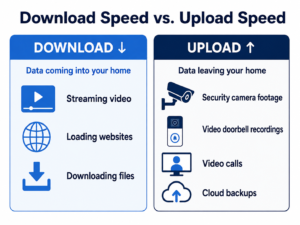
For example, Google’s Nest guidance recommends at least 2 Mbps of upload speed per camera for optimal 1080p video. Ring publishes different recommendations based on video resolution, with higher-resolution devices requiring more upload capacity.
Those numbers are requirements for specific devices – not a rule for every smart home. A smart bulb, thermostat, and 4K security camera do not use the Internet in the same way.
The takeaway is simpler: when choosing Internet for a connected home, do not look only at download speed.
Don’t Choose Internet Based on One Mbps Number
The Federal Communications Commission raised its benchmark for advanced fixed broadband service to 100 Mbps download and 20 Mbps upload in 2024.
That does not mean every smart home needs exactly 100/20 Mbps. The FCC benchmark is a broadband policy standard, not a smart home speed recommendation.
Your needs depend on the number of people in your home, the devices you use, what those devices are doing, and how much activity happens simultaneously.
Why Fiber Internet Is a Strong Foundation for Smart Homes
Smart homes do not require Fiber Internet. Connected devices can work over other broadband technologies.
However, Fiber can provide a strong foundation for households with many connected devices because it is designed to support high bandwidth, strong upload performance, low latency, and simultaneous Internet activity.
Symmetrical Speeds Support Two-Way Activity
Traditional Internet discussions often focus heavily on download speed. That makes sense when you are streaming a movie or loading a webpage, because most of the data is traveling toward you.
A modern connected household also sends significant amounts of data in the opposite direction. Security cameras upload video. Video calls transmit your picture and audio. Cloud backups send files away from your devices. Photos, videos, documents, and other data may be uploaded throughout the day.
Fiber Internet can offer strong upload performance, and some Fiber services provide symmetrical speeds, meaning upload and download speeds are similar or equal.
That can be especially valuable when several people and smart devices are using the network at once.
Clearwave’s residential service uses a 100% Fiber-to-the-home network, and current residential plans offer matching upload and download speeds. Because available plans vary by market, families should check their address to see which Fiber options are available to them.
Fiber Can Support a More Responsive Connected Home
Speed is not the only part of Internet performance.
Latency refers to how long it takes data to travel across a network. Lower latency can make connected services feel more responsive because information spends less time traveling back and forth.
In its 2024 Measuring Broadband America report, the FCC found idle latency of roughly 7-14 milliseconds among the Fiber providers in its measured sample, compared with about 12-24 milliseconds for cable.
Those measurements came from a limited group of providers and should not be interpreted as a guarantee that every Fiber plan will always have lower latency than every cable plan. Your actual experience can also depend on location, the destination server, your equipment, and the application you are using.
Still, lower latency, strong bandwidth, and high upload capability can all contribute to a more responsive connected-home experience.
| Smart Home Consideration | Why It Matters |
|---|---|
| Upload performance | Cameras and cloud-connected devices send data out |
| Download performance | Streaming and other activities bring data into the home |
| Latency | Lower delay can improve responsiveness |
| Simultaneous users | Your family’s combined activity increases network demand |
| Reliability | Connected devices are most useful when connectivity is consistent |
Fiber and Wi-Fi Are Not the Same Thing
Fiber Internet and Wi-Fi play different roles in your home.
Fiber Internet is the connection that brings Internet service to your home.
Wi-Fi distributes that Internet connection wirelessly to devices throughout your home.
That means installing fast Fiber service does not automatically eliminate every Wi-Fi problem. You might have excellent Internet service reaching your house but still experience a weak signal in an upstairs bedroom, garage, backyard, or other distant area. Poor router placement, interference, outdated equipment, or the layout of your home can all affect Wi-Fi performance.
The FCC has specifically noted that in-home Wi-Fi can become a bottleneck and prevent devices from experiencing the full performance of the broadband service delivered to a home.
In simple terms, Fiber can give your home a strong Internet foundation, but your Wi-Fi network still needs to distribute that connection effectively.
When a Router or Mesh System May Matter
If your smart doorbell responds slowly or an outdoor security camera frequently disconnects, do not automatically assume you need faster Internet.
First, consider where the device is located and how strong the Wi-Fi signal is there.
Large homes, multiple floors, detached garages, outdoor cameras, and devices located far from the router may require improved Wi-Fi coverage. In some homes, updated networking equipment or a mesh Wi-Fi system can help extend coverage.
The right solution depends on the problem. Faster service and better Wi-Fi coverage are related, but they are not interchangeable.
Smart Home Readiness Checklist for Families
You do not need to rebuild your entire technology setup before adding a smart device. However, a quick review of your home network can help you identify problems before your smart home ecosystem grows.
Before adding more connected devices:
- Count your current devices. Include phones, tablets, TVs, game consoles, computers, cameras, and other connected technology – not just dedicated smart home products.
- Think about simultaneous use. Consider what your family does during the busiest part of the day.
- Identify upload-heavy devices. Pay particular attention to security cameras, video doorbells, video calls, and cloud backups.
- Check Wi-Fi coverage. Look for weak areas inside the house as well as garages, porches, and yards where smart devices may operate.
- Review your router. Older networking hardware may struggle to support a growing number of devices.
- Keep devices updated. Install security and software updates for your smart devices and router.
- Use strong, unique passwords. Your home network is part of your smart home security.
- Compare upload and download performance. Do not choose a plan based on advertised download speed alone.
- Review latency and plan details. The FCC requires standardized Broadband Consumer Labels that include typical download speed, upload speed, latency, pricing, fees, and data policies.
- Check Fiber availability. Service options can vary from one address to another.
The National Institute of Standards and Technology has also highlighted the growing importance of consumer router security as more smart-home Internet of Things (IoT) devices connect through the home network.
That does not mean Fiber itself makes your smart devices secure. It means your network equipment deserves the same attention you give the devices connected to it.
Build Your Smart Home on a Stronger Connection
A smart home can make everyday routines more convenient, automated, efficient, and connected. At the same time, adding more devices means paying attention to your Internet connection, Wi-Fi coverage, security, and the combined demands of everyone in your household.
Fiber cannot solve every smart home challenge. What it can provide is a strong Internet foundation with the bandwidth, upload capability, responsiveness, and capacity modern connected households increasingly depend on.
When you’re ready to evaluate your options, find out whether Clearwave is available at your address and explore the Internet service that best fits your connected home.
Things to check before publishing:
- Punctuation: The last Key Takeaways bullet ends without a period in the source (“…weak Wi-Fi coverage”). I left it as written, so add one if you want it consistent with the others.
- Statistics and sources: The copy cites Parks Associates (45%, 17 devices, 52%), Google Nest and Ring camera guidance, the FCC’s 100/20 benchmark, the FCC’s 2024 Measuring Broadband America latency figures, and NIST. None have links, so verify each and add links where they can be linked.
- Clearwave claims: “100% Fiber-to-the-home” and “matching upload and download speeds” are product claims. Have the product team confirm them before this goes live.
- Links: As before, the .txt file has no link addresses, so any links need the original .docx or a pasted copy to carry over.
- Review: This is customer-facing copy, so run it through your normal content review.
Frequently Asked Questions About Smart Homes
Some can, but their capabilities may be limited. Certain devices may continue basic local functions during an outage, while features that depend on cloud services, remote monitoring, app control, notifications, or voice assistants may stop working until the Internet connection returns.
Privacy and cybersecurity are important concerns because connected devices communicate through your home network and sometimes cloud services. You can reduce risk by using strong passwords, keeping software updated, choosing reputable devices, and maintaining secure router settings.
No. Smart homes can work with other broadband technologies. Fiber may be especially useful when your household has many connected devices, several people online simultaneously, or upload-heavy activities such as security-camera video, cloud backups, and video calls.
It can, but the answer depends on the devices and your network. A simple smart bulb typically creates different demands than a security camera uploading video. Router capability, Wi-Fi coverage, household activity, interference, and your Internet service can all affect performance.
Common smart home devices include smart thermostats, lights, plugs, security cameras, video doorbells, smart locks, speakers, TVs, appliances, garage door openers, and home security systems. You can build a smart home gradually rather than purchasing everything at once.